---
title: Hexo美化:本站日志创建及配置
summary: 最近在鱼塘水群,有些萌萌哒新人问到了怎么实现 本站日志 这个功能。 本站日志 的目的正是为了记录我在学习和开发过程中所做的每一项尝试与成就。这不仅是对自己努力的见证,也是希望能为其他开发者提供灵感和参考。通过这份日志,我希望能与大家共同探讨…
date: 2024-10-28T20:37:27.000Z
category: hexo
tags:
- hexo
- beautify
- log
cover: https://img.cent1pedee.top/img/update.jpg
featured: true
---
## 前言
最近在鱼塘水群,有些萌萌哒新人问到了怎么实现**本站日志**这个功能。**本站日志**的目的正是为了记录我在学习和开发过程中所做的每一项尝试与成就。这不仅是对自己努力的见证,也是希望能为其他开发者提供灵感和参考。通过这份日志,我希望能与大家共同探讨、学习与进步。
本文以本站使用的主题 `anzhiyu` 主题为例,介绍如何为主题添加**本站日志**,当然目前是处于一个及其简陋的版本,很多地方或许达不到各位的审美标准,请各位大佬多多包容。
## 样式预览
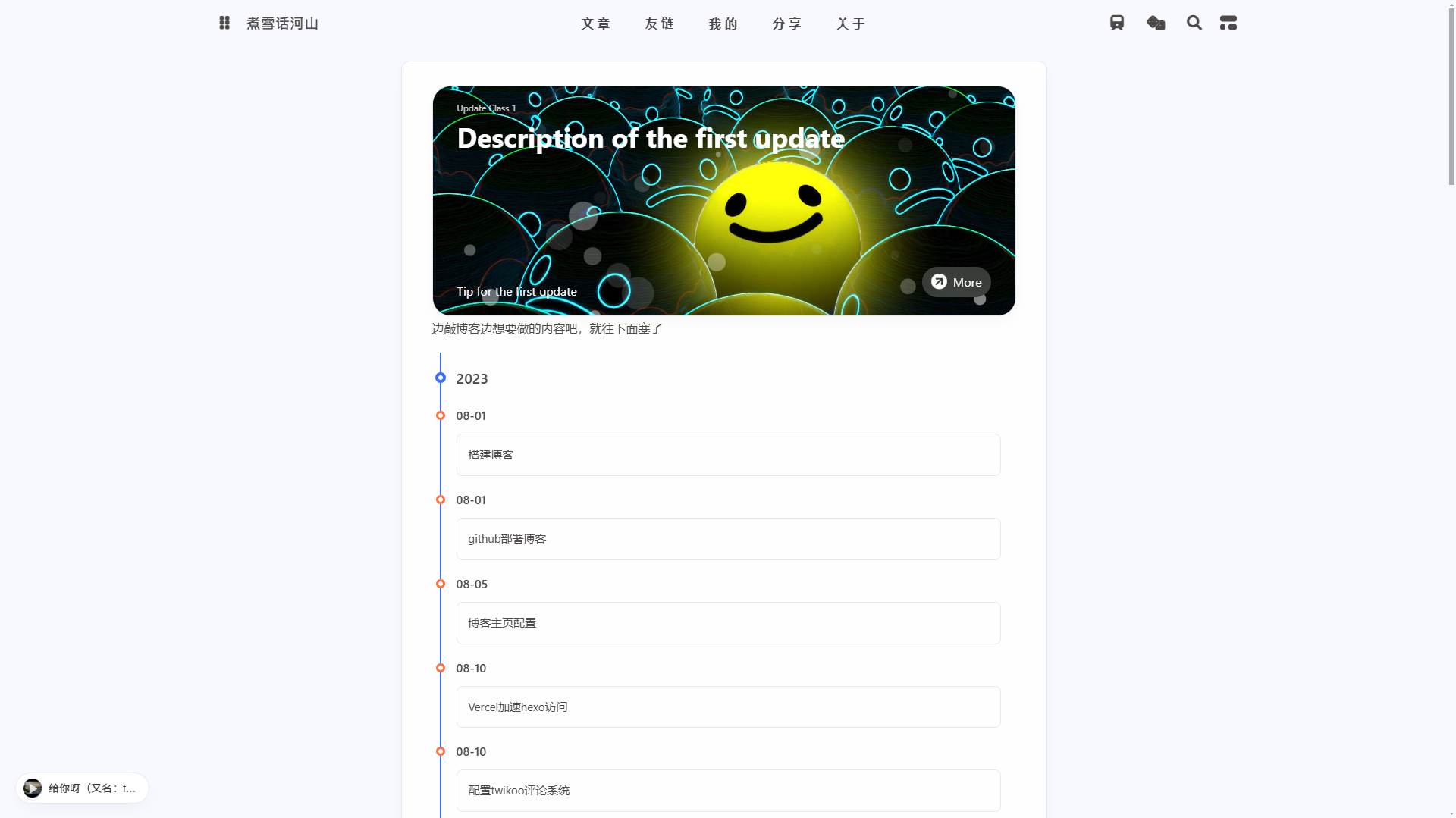
## 实现方式
## 1. 配置文件
- 在 `_config.anzhiyu.yml` 下的 `menu:` 添加 `本站日志: /update/ || xxx` , xxx 为你所想添加的图标,也可去掉。
```yaml
关于:
关于本人: /about/ || anzhiyu-icon-paper-plane
闲言碎语: /essay/ || anzhiyu-icon-lightbulb
本站日志: /update/ || xxx
```
## 2. Pug 文件修改
- 在 `themes/anzhiyu/layout/page.pug` 中添加以下内容
```pug
when 'update'
include includes/page/update.pug
```
注意,Pug 文件的缩进十分严格,在 Pug 中,缩进用于表示层级结构。
## 3. 添加 update.pug 文件
- 在 `themes/anzhiyu/layout/includes/page`下新建`update.pug`文件,并添加以下内容:
```pug
#update
if site.data.update
each i in site.data.update
.author-content.author-content-item.UpdatePage.single(style = `background: url(${i.top_background}) left 37% / cover no-repeat !important;`)
.card-content
.author-content-item-tips=i.class_name
span.author-content-item-title=i.description
.content-bottom
.tips=i.tip
.banner-button-group
a.banner-button(href=i.buttonLink)
i.anzhiyufont.anzhiyu-icon-arrow-circle-right(style='font-size: 1.3rem')
span.banner-button-text=i.buttonText
#article-container
!= page.content
```
注意,Pug 文件的缩进十分严格,在 Pug 中,缩进用于表示层级结构。
## 4. 添加 update.yml 文件
- 在 `source/_data` 下新建 `update.yml` 文件,并添加以下内容:
```yaml
- top_background: "https://xxxxxx.png"
class_name: "Update Class 1"
description: "Description of the first update"
tip: "Tip for the first update"
buttonLink: "http://link_to_update1.com"
buttonText: "More"
```
**top_background** 请自行替换为自己所喜欢的壁纸。
## 5. 新建 Update 页面
使用 `Hexo new page update` 命令新建页面,并在 `Front-matter` 中添加 `type: update`。
## 6. 大功告成
此时你已经完成了 **本站日志** 的创建,**如果需要添加内容,只需在 update 文件目录下的 index.md**中添加即可,页面支持 Markdown 格式,同时也支持 `anzhiyu` 主题下的外挂标签。你可以通过顶部的关于下的本站日志浏览完成后的效果,也可以通过下面的外挂链接浏览。