---
title: 安知鱼主题标签 Tag Plugins
summary: 添加大量外挂标签样式。
date: 2023-08-31T15:54:27.000Z
category: tag-plugins
tags:
- tag-plugins
- hexo
- repost
cover: https://img.cent1pedee.top/img/tag-plugins.png
---
`AnZhiYu主题`中大部分标签移植于[店长](https://akilar.top/)的[hexo-butterfly-tag-plugins-plus](https://www.npmjs.com/package/hexo-butterfly-tag-plugins-plus),转载请注明来自[安知鱼](https://blog.anheyu.com/posts/d50a.html)
## 段落文本 p
```markdown
{% p 样式参数(参数以空格划分), 文本内容 %}
```
1. 字体: logo, code
2. 颜色: red,yellow,green,cyan,blue,gray
3. 大小: small, h4, h3, h2, h1, large, huge, ultra
4. 对齐方向: left, center, right
- 彩色文字
在一段话中方便插入各种颜色的标签,包括:、、、、、。
- 超大号文字
文档「开始」页面中的标题部分就是超大号文字。
```markdown
- 彩色文字
在一段话中方便插入各种颜色的标签,包括:{% p red, 红色 %}、{% p yellow, 黄色 %}、{% p green, 绿色 %}、{% p cyan, 青色 %}、{% p blue, 蓝色 %}、{% p gray, 灰色 %}。
- 超大号文字
文档「开始」页面中的标题部分就是超大号文字。
{% p center logo large, Volantis %}
{% p center small, A Wonderful Theme for Hexo %}
```
## 行内文本 span
```markdown
{% span 样式参数(参数以空格划分), 文本内容 %}
```
1. 字体: logo, code
2. 颜色: red,yellow,green,cyan,blue,gray
3. 大小: small, h4, h3, h2, h1, large, huge, ultra
4. 对齐方向: left, center, right
- 彩色文字
在一段话中方便插入各种颜色的标签,包括:红色、黄色、绿色、青色、蓝色、灰色。
- 超大号文字
文档「开始」页面中的标题部分就是超大号文字。
Volantis
A Wonderful Theme for Hexo
```markdown
- 彩色文字
在一段话中方便插入各种颜色的标签,包括:{% span red, 红色 %}、{% span yellow, 黄色 %}、{% span green, 绿色 %}、{% span cyan, 青色 %}、{% span blue, 蓝色 %}、{% span gray, 灰色 %}。
- 超大号文字
文档「开始」页面中的标题部分就是超大号文字。
{% span center logo large, Volantis %}
{% span center small, A Wonderful Theme for Hexo %}
```
## 行内文本样式 text
```markdown
{% u 文本内容 %}
{% emp 文本内容 %}
{% wavy 文本内容 %}
{% del 文本内容 %}
{% kbd 文本内容 %}
{% psw 文本内容 %}
```
1. 带 下划线 的文本
2. 带 的文本
3. 带 波浪线 的文本
4. 带 的文本
5. 键盘样式的文本 +
6. 密码样式的文本:
```markdown
1. 带 {% u 下划线 %} 的文本
2. 带 {% emp 着重号 %} 的文本
3. 带 {% wavy 波浪线 %} 的文本
4. 带 {% del 删除线 %} 的文本
5. 键盘样式的文本 {% kbd command %} + {% kbd D %}
6. 密码样式的文本:{% psw 这里没有验证码 %}
```
## 分栏 tab
分栏支持内置阿里图标,如果开启了 `fontawesome`可以使用 fontawesome 的图标,否则只能使用默内置阿里图标
```markdown
{% tabs Unique name, [index] %}
Any content (support inline tags too).
{% endtabs %}
```
1. Unique name :
- 选项卡块标签的唯一名称,不带逗号。
- 将在#id 中用作每个标签及其索引号的前缀。
- 如果名称中包含空格,则对于生成#id,所有空格将由破折号代替。
- 仅当前帖子/页面的 URL 必须是唯一的!
2. [index]:
- 活动选项卡的索引号。
- 如果未指定,将选择第一个标签(1)。
- 如果 index 为-1,则不会选择任何选项卡。
- 可选参数。
3. [Tab caption]:
- 当前选项卡的标题。
- 如果未指定标题,则带有制表符索引后缀的唯一名称将用作制表符的标题。
- 如果未指定标题,但指定了图标,则标题将为空。
- 可选参数。
4. [@icon]: - FontAwesome 图标名称(全名,看起来像“ fas fa-font”) - 可以指定带空格或不带空格; - 例如'Tab caption @icon' 和 'Tab caption@icon'. - 可选参数。
Demo 1 - 预设选择第一个【默认】
**This is Tab 1.**
**This is Tab 2.**
**This is Tab 3.**
Demo 2 - 预设选择 tabs
**This is Tab 1.**
**This is Tab 2.**
**This is Tab 3.**
Demo 3 - 没有预设值
**This is Tab 1.**
**This is Tab 2.**
**This is Tab 3.**
Demo 4 - 自定义 Tab 名 + 只有 icon + icon 和 Tab 名
**tab 名字为第一个 Tab**
**只有图标 没有 Tab 名字**
**名字+icon**
Demo 1 - 预设选择第一个【默认】
```markdown
{% tabs test1 %}
**This is Tab 1.**
**This is Tab 2.**
**This is Tab 3.**
{% endtabs %}
```
Demo 2 - 预设选择 tabs
```markdown
{% tabs test2, 3 %}
**This is Tab 1.**
**This is Tab 2.**
**This is Tab 3.**
{% endtabs %}
```
Demo 3 - 没有预设值
```markdown
{% tabs test3, -1 %}
**This is Tab 1.**
**This is Tab 2.**
**This is Tab 3.**
{% endtabs %}
```
Demo 4 - 自定义 Tab 名 + 只有 icon + icon 和 Tab 名
```markdown
{% tabs test4 %}
**tab 名字为第一个 Tab**
**只有图标 没有 Tab 名字**
**名字+icon**
{% endtabs %}
```
## 按钮 btns
```markdown
{% btns 样式参数 %}
{% cell 标题, 链接, 图片或者图标 %}
{% cell 标题, 链接, 图片或者图标 %}
{% endbtns %}
```
1. 圆角样式:rounded, circle
2. 增加文字样式:可以在容器内增加 `标题 `和` 描述文字
`
3. 布局方式:
默认为自动宽度,适合视野内只有一两个的情况。
| 参数 | 含义 |
| :----- | :------------------------------------- |
| wide | 宽一点的按钮 |
| fill | 填充布局,自动铺满至少一行,多了会换行 |
| center | 居中,按钮之间是固定间距 |
| around | 居中分散 |
| grid2 | 等宽最多 2 列,屏幕变窄会适当减少列数 |
| grid3 | 等宽最多 3 列,屏幕变窄会适当减少列数 |
| grid4 | 等宽最多 4 列,屏幕变窄会适当减少列数 |
| grid5 | 等宽最多 5 列,屏幕变窄会适当减少列数 |
1. 如果需要显示类似「团队成员」之类的一组含有头像的链接:
[xaoxuu](https://xaoxuu.com)
[xaoxuu](https://xaoxuu.com)
[xaoxuu](https://xaoxuu.com)
[xaoxuu](https://xaoxuu.com)
[xaoxuu](https://xaoxuu.com)
2. 或者含有图标的按钮:
[下载源码](/)
[查看文档](/)
3. 圆形图标 + 标题 + 描述 + 图片 + 网格 5 列 + 居中
心率管家
 心率管家
 1. 如果需要显示类似「团队成员」之类的一组含有头像的链接:
```markdown
{% btns circle grid5 %}
{% cell xaoxuu, https://xaoxuu.com, https://bu.dusays.com/2023/06/01/64787e6a5816d.png %}
{% cell xaoxuu, https://xaoxuu.com, https://bu.dusays.com/2023/06/01/64787e6a5816d.png %}
{% cell xaoxuu, https://xaoxuu.com, https://bu.dusays.com/2023/06/01/64787e6a5816d.png %}
{% cell xaoxuu, https://xaoxuu.com, https://bu.dusays.com/2023/06/01/64787e6a5816d.png %}
{% cell xaoxuu, https://xaoxuu.com, https://bu.dusays.com/2023/06/01/64787e6a5816d.png %}
{% endbtns %}
```
2. 或者含有图标的按钮:
```markdown
{% btns rounded grid5 %}
{% cell 下载源码, /, anzhiyufont anzhiyu-icon-bolt %}
{% cell 查看文档, /, anzhiyufont anzhiyu-icon-book %}
{% endbtns %}
```
3. 圆形图标 + 标题 + 描述 + 图片 + 网格 5 列 + 居中
```markdown
{% btns circle center grid5 %}
心率管家
{% p red, 专业版 %}
 心率管家
{% p green, 免费版 %}
 {% endbtns %}
```
## 按钮 btn
```markdown
{% btn [url],[text],[icon],[color] [style] [layout] [position] [size] %}
[url] : 链接
[text] : 按钮文字
[icon] : [可选] 图标
[color] : [可选] 按钮背景顔色(默认 style 时)
按钮字体和边框顔色(outline 时)
default/blue/pink/red/purple/orange/green
[style] : [可选] 按钮样式 默认实心
outline/留空
[layout] : [可选] 按钮佈局 默认为 line
block/留空
[position] : [可选] 按钮位置 前提是设置了 layout 为 block 默认为左边
center/right/留空
[size] : [可选] 按钮大小
larger/留空
```
| 参数 | 含义 |
| :------- | :--------------------------------------------------------------------------------------------------------- |
| url | 链接 |
| text | 按钮文字 |
| icon | [可选] 图标,如果开启了 `fontawesome`可以使用 fontawesome 的图标,否则只能使用默内置图标 |
| color | [可选] 按钮背景顔色(默认 style 时)按钮字体和边框顔色(outline 时)default/blue/pink/red/purple/orange/green |
| style | [可选] 按钮样式 默认实心数,outline/留空 |
| layout | [可选] 按钮佈局 默认为 line block/留空 |
| position | [可选] 按钮位置 前提是设置了 layout 为 block 默认为左边 center/right/留空数 |
| size | [可选] 按钮大小 larger/留空 |
1. 一组按钮
This is my website, click the button [AnZhiYu](https://anheyu.com/)
This is my website, click the button [AnZhiYu](https://anheyu.com/)
This is my website, click the button [AnZhiYu](https://anheyu.com/)
This is my website, click the button [AnZhiYu](https://anheyu.com/)
This is my website, click the button [AnZhiYu](https://anheyu.com/)
2. 调整位置/大小
[AnZhiYu](https://anheyu.com/)
[AnZhiYu](https://anheyu.com/)
[AnZhiYu](https://anheyu.com/)
3. more than one button in center
[AnZhiYu](https://anheyu.com/)
[AnZhiYu](https://anheyu.com/)
[AnZhiYu](https://anheyu.com/)
[AnZhiYu](https://anheyu.com/)
[AnZhiYu](https://anheyu.com/)
[AnZhiYu](https://anheyu.com/)
[AnZhiYu](https://anheyu.com/)
4. 居中按钮
[AnZhiYu](https://anheyu.com/)
[AnZhiYu](https://anheyu.com/)
[AnZhiYu](https://anheyu.com/)
[AnZhiYu](https://anheyu.com/)
[AnZhiYu](https://anheyu.com/)
[AnZhiYu](https://anheyu.com/)
[AnZhiYu](https://anheyu.com/)
1. 一组按钮
```markdown
This is my website, click the button {% btn 'https://anheyu.com/',AnZhiYu %}
This is my website, click the button {% btn 'https://anheyu.com/',AnZhiYu,anzhiyufont anzhiyu-icon-circle-arrow-right %}
This is my website, click the button {% btn 'https://anheyu.com/',AnZhiYu,,outline %}
This is my website, click the button {% btn 'https://anheyu.com/',AnZhiYu,anzhiyufont anzhiyu-icon-circle-arrow-right,outline %}
This is my website, click the button {% btn 'https://anheyu.com/',AnZhiYu,anzhiyufont anzhiyu-icon-circle-arrow-right,larger %}
```
2. 调整位置/大小
```markdown
{% btn 'https://anheyu.com/',AnZhiYu,anzhiyufont anzhiyu-icon-circle-arrow-right,block %}
{% btn 'https://anheyu.com/',AnZhiYu,anzhiyufont anzhiyu-icon-circle-arrow-right,block center larger %}
{% btn 'https://anheyu.com/',AnZhiYu,anzhiyufont anzhiyu-icon-circle-arrow-right,block right outline larger %}
```
3. more than one button in center
```markdown
{% btn 'https://anheyu.com/',AnZhiYu,anzhiyufont anzhiyu-icon-circle-arrow-right,larger %}
{% btn 'https://anheyu.com/',AnZhiYu,anzhiyufont anzhiyu-icon-circle-arrow-right,blue larger %}
{% btn 'https://anheyu.com/',AnZhiYu,anzhiyufont anzhiyu-icon-circle-arrow-right,pink larger %}
{% btn 'https://anheyu.com/',AnZhiYu,anzhiyufont anzhiyu-icon-circle-arrow-right,red larger %}
{% btn 'https://anheyu.com/',AnZhiYu,anzhiyufont anzhiyu-icon-circle-arrow-right,purple larger %}
{% btn 'https://anheyu.com/',AnZhiYu,anzhiyufont anzhiyu-icon-circle-arrow-right,orange larger %}
{% btn 'https://anheyu.com/',AnZhiYu,anzhiyufont anzhiyu-icon-circle-arrow-right,green larger %}
```
4. 居中按钮
```markdown
{% btn 'https://anheyu.com/',AnZhiYu,anzhiyufont anzhiyu-icon-circle-arrow-right,outline larger %}
{% btn 'https://anheyu.com/',AnZhiYu,anzhiyufont anzhiyu-icon-circle-arrow-right,outline blue larger %}
{% btn 'https://anheyu.com/',AnZhiYu,anzhiyufont anzhiyu-icon-circle-arrow-right,outline pink larger %}
{% btn 'https://anheyu.com/',AnZhiYu,anzhiyufont anzhiyu-icon-circle-arrow-right,outline red larger %}
{% btn 'https://anheyu.com/',AnZhiYu,anzhiyufont anzhiyu-icon-circle-arrow-right,outline purple larger %}
{% btn 'https://anheyu.com/',AnZhiYu,anzhiyufont anzhiyu-icon-circle-arrow-right,outline orange larger %}
{% btn 'https://anheyu.com/',AnZhiYu,anzhiyufont anzhiyu-icon-circle-arrow-right,outline green larger %}
```
## 网站卡片 sites
```markdown
{% sitegroup %}
{% site 标题, url=链接, screenshot=截图链接, avatar=头像链接(可选), description=描述(可选) %}
{% site 标题, url=链接, screenshot=截图链接, avatar=头像链接(可选), description=描述(可选) %}
{% endsitegroup %}
```
```markdown
{% sitegroup %}
{% site xaoxuu, url=https://xaoxuu.com, screenshot=https://bu.dusays.com/2023/06/01/6478965ce6557.webp, avatar=https://cdn1.tianli0.top/gh/xaoxuu/cdn-assets/avatar/avatar.png, description=简约风格 %}
{% site Colsrch, url=https://colsrch.top, screenshot=https://i.loli.net/2020/08/22/dFRWXm52OVu8qfK.png, avatar=https://cdn1.tianli0.top/gh/Colsrch/images/Colsrch/avatar.jpg, description=这是一段关于这个网站的描述文字 %}
{% site Linhk1606, url=https://linhk1606.github.io, screenshot=https://bu.dusays.com/2023/06/01/6478963584621.png, avatar=https://bu.dusays.com/2023/06/01/6478968743368.png, description=这是一段关于这个网站的描述文字 %}
{% endsitegroup %}
```
## 单张图片 image
```markdown
{% image 链接, width=宽度(可选), height=高度(可选), alt=描述(可选), bg=占位颜色(可选) %}
```
1. 图片宽度高度:width=300px, height=32px
2. 图片描述:alt=图片描述(butterfly 需要在主题配置文件中开启图片描述)
3. 占位背景色:bg=#f2f2f2
4. 添加描述:
2. 指定宽度:
3. 指定宽度并添加描述:
4. 设置占位背景色:
1. 添加描述:
```markdown
{% image https://bu.dusays.com/2023/06/01/6478937d7de6f.webp, alt=每天下课回宿舍的路,没有什么故事。 %}
```
2. 指定宽度:
```markdown
{% image https://bu.dusays.com/2023/06/01/6478937d7de6f.webp, width=400px %}
```
3. 指定宽度并添加描述:
```markdown
{% image https://bu.dusays.com/2023/06/01/6478937d7de6f.webp, width=400px, alt=每天下课回宿舍的路,没有什么故事。 %}
```
4. 设置占位背景色:
```markdown
{% image https://bu.dusays.com/2023/06/01/6478937d7de6f.webp, width=400px, bg=#1D0C04, alt=优化不同宽度浏览的观感 %}
```
## inlineImg 行内图片
```markdown
{% inlineImg [src] [height] %}
[src] : 图片链接
[height] : 图片高度限制【可选】
```
| 参数 | 含义 |
| :----- | :------------------- |
| src | 图片链接 |
| height | 图片高度限制【可选】 |
你看我长得漂亮不

我觉得很漂亮
```
你看我长得漂亮不

我觉得很漂亮 {% inlineImg https://i.loli.net/2021/03/19/5M4jUB3ynq7ePgw.png 150px %}
```
## 行内图片 inlineimage
```markdown
{% inlineimage 图片链接, height=高度(可选) %}
```
1. 高度:height=20px
这是 一段话。
这又是 一段话。
```markdown
这是 {% inlineimage https://bu.dusays.com/2023/06/01/647895232e5d5.webp %} 一段话。
这又是 {% inlineimage https://bu.dusays.com/2022/05/19/6285328a83ca7.gif, height=40px %} 一段话。
```
## label 标签
```markdown
{% label text color %}
```
| 参数 | 含义 |
| :---- | :-------------------------------------------------------------------------- |
| text | 文字 |
| color | 【可选】背景颜色,默认为 default,default/blue/pink/red/purple/orange/green |
臣亮言:创业未半,而。今天下三分,,此诚也!然侍衞之臣,不懈于内;,忘身于外者,盖追先帝之殊遇,欲报之于陛下也。诚宜开张圣听,以光先帝遗德,恢弘志士之气;不宜妄自菲薄,引喻失义,以塞忠谏之路也。
宫中、府中,俱为一体;陟罚臧否,不宜异同。若有、,及为忠善者,宜付有司,论其刑赏,以昭陛下平明之治;不宜偏私,使内外异法也。
```
臣亮言:{% label 先帝 %}创业未半,而{% label 中道崩殂 blue %}。今天下三分,{% label 益州疲敝 pink %},此诚{% label 危急存亡之秋 red %}也!然侍衞之臣,不懈于内;{% label 忠志之士 purple %},忘身于外者,盖追先帝之殊遇,欲报之于陛下也。诚宜开张圣听,以光先帝遗德,恢弘志士之气;不宜妄自菲薄,引喻失义,以塞忠谏之路也。
宫中、府中,俱为一体;陟罚臧否,不宜异同。若有{% label 作奸 orange %}、{% label 犯科 green %},及为忠善者,宜付有司,论其刑赏,以昭陛下平明之治;不宜偏私,使内外异法也。
```
## timeline
```markdown
{% timeline title,color %}
xxxxx
xxxxx
{% endtimeline %}
```
| 参数 | 含义 |
| :---- | :------------------------------------------------------------------------- |
| title | 标题/时间线 |
| color | timeline 颜色,default(留空) / blue / pink / red / purple / orange / green |
1. 默认颜色
这是测试页面
2. blue
这是测试页面
3. pink
这是测试页面
4. red
这是测试页面
5. purple
这是测试页面
6. orange
这是测试页面
7. green
这是测试页面
1. 默认颜色
```
{% timeline 2022 %}
这是测试页面
{% endtimeline %}
```
2. blue
```
{% timeline 2022,blue %}
这是测试页面
{% endtimeline %}
```
3. pink
```
{% timeline 2022,pink %}
这是测试页面
{% endtimeline %}
```
4. red
```
{% timeline 2022,red %}
这是测试页面
{% endtimeline %}
```
5. purple
```
{% timeline 2022,purple %}
这是测试页面
{% endtimeline %}
```
6. orange
```
{% timeline 2022,orange %}
这是测试页面
{% endtimeline %}
```
7. green
```
{% timeline 2022,green %}
这是测试页面
{% endtimeline %}
```
## flink 友链标签
可在任何界面插入类似`友情链接`列表效果,内容格式与友情链接界面一样,支持 `yml 格式`,注意`yml数据`具有格式要求,请注意格式对齐,防止被编辑器格式化导致格式错误从而报错。
```markdown
{% flink %}
xxxxxx
{% endflink %}
```
| 参数 | 含义 |
| :---- | :-------------------------------------------------------------------------- |
| class_name | h2标题 |
| flink_style | 【可选】友链样式,默认为 flexcard,flexcard/anzhiyu |
| link_list | 【可选】友链样式,默认为 flexcard,flexcard/anzhiyu |
- class_name: 推荐博客
flink_style: flexcard
link_list:
- name: 安知鱼
link: https://anheyu.com/
avatar: https://img02.anheyu.com/adminuploads/1/2022/09/15/63232b7d91d22.jpg
descr: 生活明朗,万物可爱
siteshot: https://npm.elemecdn.com/anzhiyu-blog@1.1.6/img/post/common/anheyu.com.jpg
- class_name: 网站
class_desc: 值得推荐的网站
flink_style: anzhiyu
link_list:
- name: Youtube
link: https://www.youtube.com/
avatar: https://i.loli.net/2020/05/14/9ZkGg8v3azHJfM1.png
descr: 视频网站
- name: Weibo
link: https://www.weibo.com/
avatar: https://i.loli.net/2020/05/14/TLJBum386vcnI1P.png
descr: 中国最大社交分享平台
- name: Twitter
link: https://twitter.com/
avatar: https://i.loli.net/2020/05/14/5VyHPQqR6LWF39a.png
descr: 社交分享平台
```markdown
{% flink %}
- class_name: 推荐博客
flink_style: flexcard
link_list:
- name: 安知鱼
link: https://anheyu.com/
avatar: https://img02.anheyu.com/adminuploads/1/2022/09/15/63232b7d91d22.jpg
descr: 生活明朗,万物可爱
siteshot: https://npm.elemecdn.com/anzhiyu-blog@1.1.6/img/post/common/anheyu.com.jpg
- class_name: 网站
class_desc: 值得推荐的网站
flink_style: anzhiyu
link_list:
- name: Youtube
link: https://www.youtube.com/
avatar: https://i.loli.net/2020/05/14/9ZkGg8v3azHJfM1.png
descr: 视频网站
- name: Weibo
link: https://www.weibo.com/
avatar: https://i.loli.net/2020/05/14/TLJBum386vcnI1P.png
descr: 中国最大社交分享平台
- name: Twitter
link: https://twitter.com/
avatar: https://i.loli.net/2020/05/14/5VyHPQqR6LWF39a.png
descr: 社交分享平台
{% endflink %}
```
## mermaid 图
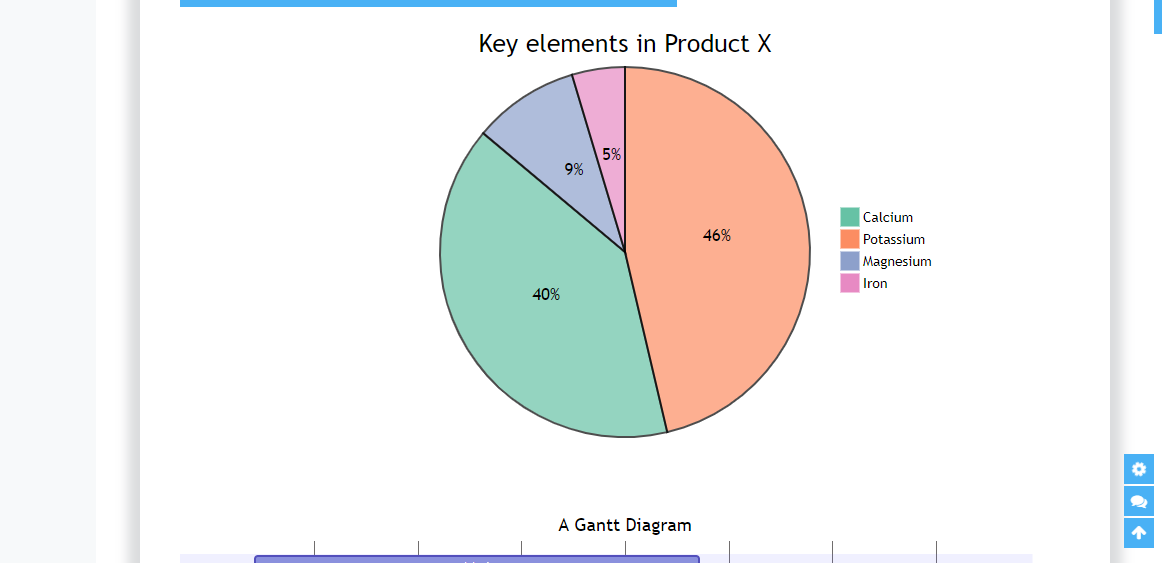
使用`mermaid标签`可以绘制Flowchart(流程图)、Sequence diagram(时序图 )、Class Diagram(类别图)、State Diagram(状态图)、Gantt(甘特图)和Pie Chart(圆形图),具体可以查看[mermaid文档](https://mermaid.js.org/#/)
修改 `主题配置文件`
```yml
# mermaid
# see https://github.com/mermaid-js/mermaid
mermaid:
enable: true
# built-in themes: default/forest/dark/neutral
theme:
light: default
dark: dark
```
```markdown
{% mermaid %}
内容
{% endmermaid %}
```
```
{% mermaid %}
pie
title Key elements in Product X
"Calcium" : 42.96
"Potassium" : 50.05
"Magnesium" : 10.01
"Iron" : 5
{% endmermaid %}
```
## 复选列表 checkbox
```markdown
{% checkbox 样式参数(可选), 文本(支持简单md) %}
```
1. 样式: plus, minus, times
2. 颜色: red,yellow,green,cyan,blue,gray
3. 选中状态: checked
```markdown
{% checkbox 纯文本测试 %}
{% checkbox checked, 支持简单的 [markdown](https://guides.github.com/features/mastering-markdown/) 语法 %}
{% checkbox red, 支持自定义颜色 %}
{% checkbox green checked, 绿色 + 默认选中 %}
{% checkbox yellow checked, 黄色 + 默认选中 %}
{% checkbox cyan checked, 青色 + 默认选中 %}
{% checkbox blue checked, 蓝色 + 默认选中 %}
{% checkbox plus green checked, 增加 %}
{% checkbox minus yellow checked, 减少 %}
{% checkbox times red checked, 叉 %}
```
## dogeplayer 多吉云播放器
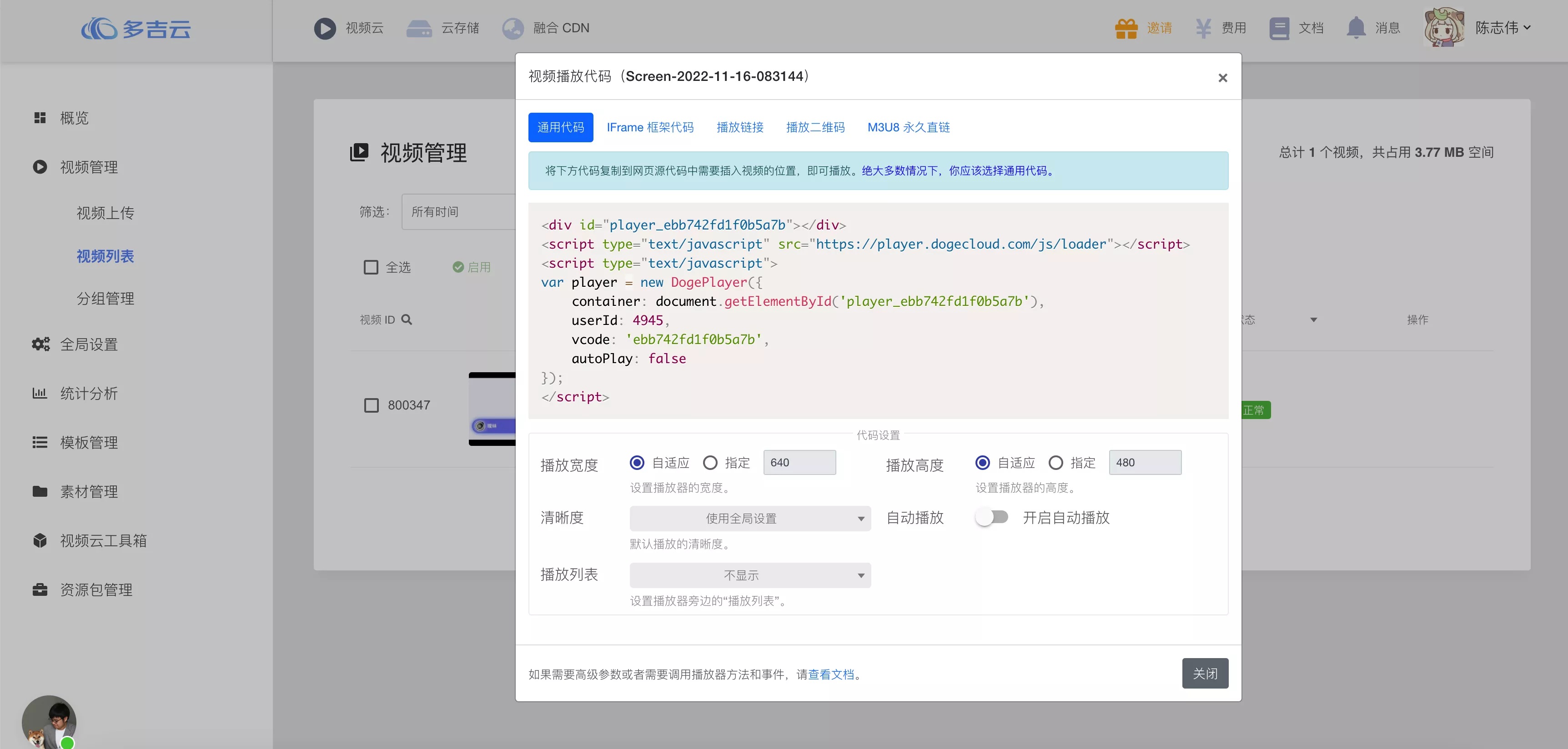
快捷引入[多吉云视频](https://console.dogecloud.com/vod/overview)
```markdown
{% dogeplayer 4945 ebb742fd1f0b5a7b %}
```
获取`userId`与`vcode`
| 参数 | 含义 |
| :---- | :-------------------------------------------------------------------------- |
| userId | 多吉云userId |
| vcode | 视频vcode |

```
{% dogeplayer 4945 ebb742fd1f0b5a7b %}
```
## 折叠框 folding
折叠框folding
```markdown
{% folding 参数(可选), 标题 %}

{% endfolding %}
```
1. 颜色:blue, cyan, green, yellow, red
2. 状态:状态填写 open 代表默认打开。

这是一个默认打开的折叠框。
```markdown

```
- haha
- hehe
hahaha  ```markdown
{% folding 查看图片测试 %}

{% endfolding %}
{% folding cyan open, 查看默认打开的折叠框 %}
这是一个默认打开的折叠框。
{% endfolding %}
{% folding green, 查看代码测试 %}
假装这里有代码块(代码块没法嵌套代码块)
{% endfolding %}
{% folding yellow, 查看列表测试 %}
- haha
- hehe
{% endfolding %}
{% folding red, 查看嵌套测试 %}
{% folding blue, 查看嵌套测试2 %}
{% folding 查看嵌套测试3 %}
hahaha
{% endfolding %}
{% endfolding %}
{% endfolding %}
```
## Gallery 相册图库
一个图库集合。
1. gallerygroup 相册图库
```markdown
{% galleryGroup name description link img-url %}
{% galleryGroup name description link img-url %}
{% galleryGroup name description link img-url %}
```
2. gallery 相册
```markdown
{% gallery %}
markdown 图片格式
{% endgallery %}
{% gallery true,220,10 %}
markdown 图片格式
{% endgallery %}
{% gallery true,,10 %}
markdown 图片格式
{% endgallery %}
```
| 参数名 | 释义 |
| --------- | ------------------------------------------------------------------------------------ |
| lazyload | 【可选】点击按钮加载更多图片,填写 true/false。默认为 `false`。 |
| rowHeight | 【可选】图片显示的高度,如果需要一行显示更多的图片,可设置更小的数字。默认为 `220`。 |
| limit | 【可选】每次加载多少张照片。默认为 `10`。 |
```markdown
{% gallery url,[link],[lazyload],[rowHeight],[limit] %}
{% endgallery %}
```
| 参数名 | 释义 |
| --------- | ------------------------------------------------------------------------------------ |
| url | 【必须】 识别词 |
| link | 【必须】远程的 json 链接 |
| lazyload | 【可选】点击按钮加载更多图片,填写 true/false。默认为 `false`。 |
| rowHeight | 【可选】图片显示的高度,如果需要一行显示更多的图片,可设置更小的数字。默认为 `220`。 |
| limit | 【可选】每次加载多少张照片。默认为 `10`。 |
> 远程链接 Json 的例子
有三个参数,`url`是必须存在的,`alt` 和 `title` 可有,也可没有。
```json
[
{
"url": "https://cdn1.tianli0.top/gh/jerryc127/CDN/img/IMG_0556.jpg",
"alt": "IMG_0556.jpg",
"title": "这是title"
},
{
"url": "https://cdn1.tianli0.top/gh/jerryc127/CDN/img/IMG_0472.jpg",
"alt": "IMG_0472.jpg"
},
{
"url": "https://cdn1.tianli0.top/gh/jerryc127/CDN/img/IMG_0453.jpg",
"alt": ""
},
{
"url": "https://cdn1.tianli0.top/gh/jerryc127/CDN/img/IMG_0931.jpg",
"alt": ""
}
]
```
> 示例
```markdown
{% gallery url,https://xxxx.com/sss.json %}
{% endgallery %}
{% gallery url,https://xxxx.com/sss.json,true,220,10 %}
{% endgallery %}
{% gallery url,https://xxxx.com/sss.json,true,,10 %}
{% endgallery %}
```
- gallerygroup 相册图库
| 参数名 | 释义 |
| :---------- | :------------------- |
| name | 图库名字 |
| description | 图库描述 |
| link | 链接到对应相册的地址 |
| img-url | 图库封面 |
思维拓展一下,相册图库的实质其实就是个快捷方式,可以自定义添加描述、封面、链接。那么我们未必要把它当做一个相册,完全可以作为一个链接卡片,链接到视频、QQ、友链都是不错的选择。
- gallery 相册
区别于旧版的 Gallery 相册,新的 Gallery 相册会自动根据图片长度进行排版,书写也更加方便,与 markdown 格式一样。可根据需要插入到相应的 md。无需再自己配置长宽。**建议在粘贴时故意使用长短、大小、横竖不一的图片**,会有更好的效果。(尺寸完全相同的图片只会平铺输出,效果很糟糕)
```markdown
{% gallery %}
markdown 图片格式
{% endgallery %}
{% gallery true,220,10 %}
markdown 图片格式
{% endgallery %}
{% gallery true,,10 %}
markdown 图片格式
{% endgallery %}
```
| 参数名 | 释义 |
| --------- | ------------------------------------------------------------------------------------ |
| lazyload | 【可选】点击按钮加载更多图片,填写 true/false。默认为 `false`。 |
| rowHeight | 【可选】图片显示的高度,如果需要一行显示更多的图片,可设置更小的数字。默认为 `220`。 |
| limit | 【可选】每次加载多少张照片。默认为 `10`。 |
```markdown
{% gallery url,[link],[lazyload],[rowHeight],[limit] %}
{% endgallery %}
```
| 参数名 | 释义 |
| --------- | ------------------------------------------------------------------------------------ |
| url | 【必须】 识别词 |
| link | 【必须】远程的 json 链接 |
| lazyload | 【可选】点击按钮加载更多图片,填写 true/false。默认为 `false`。 |
| rowHeight | 【可选】图片显示的高度,如果需要一行显示更多的图片,可设置更小的数字。默认为 `220`。 |
| limit | 【可选】每次加载多少张照片。默认为 `10`。 |
> 远程链接 Json 的例子
有三个参数,`url`是必须存在的,`alt` 和 `title` 可有,也可没有。
```json
[
{
"url": "https://cdn1.tianli0.top/gh/jerryc127/CDN/img/IMG_0556.jpg",
"alt": "IMG_0556.jpg",
"title": "这是title"
},
{
"url": "https://cdn1.tianli0.top/gh/jerryc127/CDN/img/IMG_0472.jpg",
"alt": "IMG_0472.jpg"
},
{
"url": "https://cdn1.tianli0.top/gh/jerryc127/CDN/img/IMG_0453.jpg",
"alt": ""
},
{
"url": "https://cdn1.tianli0.top/gh/jerryc127/CDN/img/IMG_0931.jpg",
"alt": ""
}
]
```
> 示例
```markdown
{% gallery url,https://xxxx.com/sss.json %}
{% endgallery %}
{% gallery url,https://xxxx.com/sss.json,true,220,10 %}
{% endgallery %}
{% gallery url,https://xxxx.com/sss.json,true,,10 %}
{% endgallery %}
```
- gallerygroup 相册图库
- gallery 相册






对于很多同学提问的`gallerygroup`和`gallery`相册页的链接问题。这里说下我个人的使用习惯。
一般使用相册图库的话,可以在导航栏加一个 gallery 的 page(**使用指令`hexo new page gallery`添加**),里面放相册图库作为封面。然后在`[Blogroot]/source/gallery/`下面建立相应的文件夹,例如若按照这里的示例,若欲使用`/gallery/MC/`路径访问 MC 相册,则需要新建`[Blogroot]/source/gallery/MC/index.md`,并在里面填入`gallery`相册内容。
注意 ⚠️:本站相册集为单独优化,可参考[配置相册页面](https://anheyu.com/posts/220c.html)。
1. gallerygroup 相册图库
```markdown
{% galleryGroup MC 在Rikkaの六花服务器里留下的足迹 '/wordScenery/' https://bu.dusays.com/2023/06/01/64788f24d05bd.webp %}
{% galleryGroup Gundam 哦咧哇gundam哒! '/thousand/' https://bu.dusays.com/2023/06/01/64788f456fc3d.webp %}
{% galleryGroup I-am-Akilar 某种意义上也算自拍吧 '/wallpaper/' https://bu.dusays.com/2023/06/01/64788f83e5fa1.webp %}
```
2. gallery 相册
```markdown
{% gallery true,,2 %}







{% endgallery %}
```
## tag-hide
如果你想把一些文字、内容隐藏起来,并提供按钮让用户点击显示。可以使用这个标签外挂。
请注意,tag-hide内的标签外挂content内都不建议有h1 - h6 等标题。因为Toc会把隐藏内容标题也显示出来,而且当滚动屏幕时,如果隐藏内容没有显示出来,会导致Toc的滚动出现异常。
`inline` 在文本里面添加按钮隐藏内容,只限文字
( content不能包含英文逗号,可用`‚`)
```markdown
{% hideInline content,display,bg,color %}
```
- content: 文本内容
- display: 按钮显示的文字(可选)
- bg: 按钮的背景颜色(可选)
- color: 按钮文字的颜色(可选)
> Demo
```markdown
哪个英文字母最酷? {% hideInline 因为西装裤(C装酷),查看答案,#FF7242,#fff %}
门里站着一个人? {% hideInline 闪 %}
```
哪个英文字母最酷?
门里站着一个人?
`block`独立的block隐藏内容,可以隐藏很多内容,包括图片,代码块等等
( display 不能包含英文逗号,可用`‚`)
```markdown
{% hideBlock display,bg,color %}
content
{% endhideBlock %}
```
- content: 文本内容
- display: 按钮显示的文字(可选)
- bg: 按钮的背景颜色(可选)
- color: 按钮文字的颜色(可选)
> Demo
```markdown
查看答案
{% hideBlock 查看答案 %}
傻子,怎么可能有答案
{% endhideBlock %}
```
查看答案
傻子,怎么可能有答案
如果你需要展示的内容太多,可以把它隐藏在收缩框里,需要时再把它展开。
( display 不能包含英文逗号,可用`‚`)
```markdown
{% hideToggle display,bg,color %}
content
{% endhideToggle %}
```
> Demo
在你的博客根目录里
git clone -b master https://github.com/anzhiyu-c/hexo-theme-anzhiyu.git themes/anzhiyu
如果想要安装比较新的dev分支,可以
git clone -b dev https://github.com/anzhiyu-c/hexo-theme-anzhiyu.git themes/anzhiyu
## 链接卡片 link
```markdown
{% link 标题, 站点描述, 链接, 图片链接(可选) %}
```
```markdown
{% link 获取网站的Favicon图标并显示在你的网页上,owen0o0,https://github.com/owen0o0/getFavicon %}
```
## 单选列表 radio
```markdown
{% radio 样式参数(可选), 文本(支持简单md) %}
```
1. 颜色: red,yellow,green,cyan,blue,gray
2. 选中状态: checked
```markdown
{% radio 纯文本测试 %}
{% radio checked, 支持简单的 [markdown](https://guides.github.com/features/mastering-markdown/) 语法 %}
{% radio red, 支持自定义颜色 %}
{% radio green, 绿色 %}
{% radio yellow, 黄色 %}
{% radio cyan, 青色 %}
{% radio blue, 蓝色 %}
```
## 上标标签 tip
主要样式参考自[小康的 butterfly 渐变背景标签](https://www.antmoe.com/posts/3b43914f/)
```markdown
{% tip [参数,可选] %}文本内容{% endtip %}
```
1. 样式: success,error,warning,bolt,ban,home,sync,cogs,key,bell
2. 自定义图标: 支持 fontawesome。
default
info
success
error
warning
bolt
ban
home
sync
cogs
key
bell
自定义 font awesome 图标
```markdown
{% tip %}default{% endtip %}
{% tip info %}info{% endtip %}
{% tip success %}success{% endtip %}
{% tip error %}error{% endtip %}
{% tip warning %}warning{% endtip %}
{% tip bolt %}bolt{% endtip %}
{% tip ban %}ban{% endtip %}
{% tip home %}home{% endtip %}
{% tip sync %}sync{% endtip %}
{% tip cogs %}cogs{% endtip %}
{% tip key %}key{% endtip %}
{% tip bell %}bell{% endtip %}
{% tip fa-atom %}自定义 font awesome 图标{% endtip %}
```
## Note (Bootstrap Callout)
修改主题配置文件
```yml
note:
# Note tag style values:
# - simple bs-callout old alert style. Default.
# - modern bs-callout new (v2-v3) alert style.
# - flat flat callout style with background, like on Mozilla or StackOverflow.
# - disabled disable all CSS styles import of note tag.
style: simple
icons: false
border_radius: 3
# Offset lighter of background in % for modern and flat styles (modern: -12 | 12; flat: -18 | 6).
# Offset also applied to label tag variables. This option can work with disabled note tag.
light_bg_offset: 0
```
`Note`标签外挂有两种用法。`icons`和`light_bg_offset`只对方法一生效。
`fontawesome`图标需开启主题配置文件中`icons.fontawesome`
`方法一`
```markdown
{% note [class] [no-icon] [style] %}
Any content (support inline tags too.io).
{% endnote %}
```
`方法二`
```markdown
{% note [color] [icon] [style] %}
Any content (support inline tags too.io).
{% endnote %}
```
`方法一`
| 参数 | 用法 |
| :------ | :-------------------------------------------------------------------------------------------------- |
| class | 【可选】标识,不同的标识有不同的配色
( default / primary / success / info / warning / danger ) |
| no-icon | 【可选】不显示 icon |
| style | 【可选】可以覆盖配置中的 style
(simple/modern/flat/disabled) |
`方法二`
|参数|用法|
|:--|:-------------|
|class|【可选】标识,不同的标识有不同的配色
( default / blue / pink / red / purple / orange / green )|
|no-icon|【可选】可配置自定义 icon (支持 fontawesome 图标和主题内置的阿里图标,`fontawesome`图标需开启主题配置文件中`icons.fontawesome`, 也可以配置 no-icon )|
|style| 【可选】可以覆盖配置中的 style
(simple/modern/flat/disabled)|
`方法一`
1. `simple`样式
默认 提示块标签
default 提示块标签
primary 提示块标签
success 提示块标签
info 提示块标签
warning 提示块标签
danger 提示块标签
2. `modern`样式
默认 提示块标签
default 提示块标签
primary 提示块标签
success 提示块标签
info 提示块标签
warning 提示块标签
danger 提示块标签
3. `flat`样式
默认 提示块标签
default 提示块标签
primary 提示块标签
success 提示块标签
info 提示块标签
warning 提示块标签
danger 提示块标签
4. `disabled`样式
默认 提示块标签
default 提示块标签
primary 提示块标签
success 提示块标签
info 提示块标签
warning 提示块标签
danger 提示块标签
5. `no-icon`样式
默认 提示块标签
default 提示块标签
primary 提示块标签
success 提示块标签
info 提示块标签
warning 提示块标签
danger 提示块标签
`方法二`
图标支持 `fontawesome` 和 `主题内置的阿里图标`,使用方法为加上对应的类名,`fontawesome`图标需开启主题配置文件中`icons.fontawesome`,默认未开启 fontawesome
1. simple 样式
`主题内置阿里图标`
你是刷 Visa 还是 UnionPay
2022 年快到了....
小心开车 安全至上
这是三片呢?还是四片?
你是刷 Visa 还是 UnionPay
剪刀石头布
前端最讨厌的浏览器
`fontawesome 图标`,开启主题配置文件中的`icons.fontawesome`为`true`后可见
你是刷 Visa 还是 UnionPay
2022 年快到了....
小心开车 安全至上
这是三片呢?还是四片?
你是刷 Visa 还是 UnionPay
剪刀石头布
前端最讨厌的浏器
2. modern 样式
`主题内置阿里图标`
你是刷 Visa 还是 UnionPay
2022 年快到了....
小心开车 安全至上
这是三片呢?还是四片?
你是刷 Visa 还是 UnionPay
剪刀石头布
前端最讨厌的浏览器
fontawesome 图标,开启主题配置文件中的icons.fontawesome为true后可见
你是刷 Visa 还是 UnionPay
2021 年快到了....
小心开车 安全至上
这是三片呢?还是四片?
你是刷 Visa 还是 UnionPay
剪刀石头布
前端最讨厌的浏览器
3. flat 样式
`主题内置阿里图标`
你是刷 Visa 还是 UnionPay
2022 年快到了....
小心开车 安全至上
这是三片呢?还是四片?
你是刷 Visa 还是 UnionPay
剪刀石头布
前端最讨厌的浏览器
fontawesome 图标,开启主题配置文件中的icons.fontawesome为true后可见
你是刷 Visa 还是 UnionPay
2021 年快到了....
小心开车 安全至上
这是三片呢?还是四片?
你是刷 Visa 还是 UnionPay
剪刀石头布
前端最讨厌的浏览器
4. disabled 样式
`主题内置阿里图标`
你是刷 Visa 还是 UnionPay
2022 年快到了....
小心开车 安全至上
这是三片呢?还是四片?
你是刷 Visa 还是 UnionPay
剪刀石头布
前端最讨厌的浏览器
fontawesome 图标,开启主题配置文件中的icons.fontawesome为true后可见
你是刷 Visa 还是 UnionPay
2021 年快到了....
小心开车 安全至上
这是三片呢?还是四片?
你是刷 Visa 还是 UnionPay
剪刀石头布
前端最讨厌的浏览器
5. no-icon 样式
你是刷 Visa 还是 UnionPay
2021 年快到了....
小心开车 安全至上
这是三片呢?还是四片?
你是刷 Visa 还是 UnionPay
剪刀石头布
前端最讨厌的浏览器
`方法一`
1. `simple`样式
```markdown
{% note simple %}默认 提示块标签{% endnote %}
{% note default simple %}default 提示块标签{% endnote %}
{% note primary simple %}primary 提示块标签{% endnote %}
{% note success simple %}success 提示块标签{% endnote %}
{% note info simple %}info 提示块标签{% endnote %}
{% note warning simple %}warning 提示块标签{% endnote %}
{% note danger simple %}danger 提示块标签{% endnote %}
```
2. `modern`样式
```markdown
{% note modern %}默认 提示块标签{% endnote %}
{% note default modern %}default 提示块标签{% endnote %}
{% note primary modern %}primary 提示块标签{% endnote %}
{% note success modern %}success 提示块标签{% endnote %}
{% note info modern %}info 提示块标签{% endnote %}
{% note warning modern %}warning 提示块标签{% endnote %}
{% note danger modern %}danger 提示块标签{% endnote %}
```
3. `flat`样式
```markdown
{% note flat %}默认 提示块标签{% endnote %}
{% note default flat %}default 提示块标签{% endnote %}
{% note primary flat %}primary 提示块标签{% endnote %}
{% note success flat %}success 提示块标签{% endnote %}
{% note info flat %}info 提示块标签{% endnote %}
{% note warning flat %}warning 提示块标签{% endnote %}
{% note danger flat %}danger 提示块标签{% endnote %}
```
4. `disabled`样式
```markdown
{% note disabled %}默认 提示块标签{% endnote %}
{% note default disabled %}default 提示块标签{% endnote %}
{% note primary disabled %}primary 提示块标签{% endnote %}
{% note success disabled %}success 提示块标签{% endnote %}
{% note info disabled %}info 提示块标签{% endnote %}
{% note warning disabled %}warning 提示块标签{% endnote %}
{% note danger disabled %}danger 提示块标签{% endnote %}
```
5. `no-icon`样式
```markdown
{% note no-icon %}默认 提示块标签{% endnote %}
{% note default no-icon %}default 提示块标签{% endnote %}
{% note primary no-icon %}primary 提示块标签{% endnote %}
{% note success no-icon %}success 提示块标签{% endnote %}
{% note info no-icon %}info 提示块标签{% endnote %}
{% note warning no-icon %}warning 提示块标签{% endnote %}
{% note danger no-icon %}danger 提示块标签{% endnote %}
```
`方法二`
图标支持 `fontawesome` 和 `主题内置的阿里图标`,使用方法为加上对应的类名,`fontawesome`图标需开启主题配置文件中`icons.fontawesome`,默认未开启 fontawesome
1. simple 样式
`主题内置阿里图标`
```markdown
{% note 'anzhiyufont anzhiyu-icon-rocket' simple %}你是刷 Visa 还是 UnionPay{% endnote %}
{% note blue 'anzhiyufont anzhiyu-icon-bullhorn' simple %}2022 年快到了....{% endnote %}
{% note pink 'anzhiyufont anzhiyu-icon-instagram' simple %}小心开车 安全至上{% endnote %}
{% note red 'anzhiyufont anzhiyu-icon-fan' simple%}这是三片呢?还是四片?{% endnote %}
{% note orange 'anzhiyufont anzhiyu-icon-dengpao' simple %}你是刷 Visa 还是 UnionPay{% endnote %}
{% note purple 'anzhiyufont anzhiyu-icon-sanmingzhi' simple %}剪刀石头布{% endnote %}
{% note green 'anzhiyufont anzhiyu-icon-ic_train' simple %}前端最讨厌的浏览器{% endnote %}
```
fontawesome 图标,开启主题配置文件中的icons.fontawesome为true后可见
```markdown
{% note 'fab fa-cc-visa' simple %}你是刷 Visa 还是 UnionPay{% endnote %}
{% note blue 'fas fa-bullhorn' simple %}2022 年快到了....{% endnote %}
{% note pink 'fas fa-car-crash' simple %}小心开车 安全至上{% endnote %}
{% note red 'icon-fan' simple%}这是三片呢?还是四片?{% endnote %}
{% note orange 'fas fa-battery-half' simple %}你是刷 Visa 还是 UnionPay{% endnote %}
{% note purple 'far fa-hand-scissors' simple %}剪刀石头布{% endnote %}
{% note green 'fab fa-internet-explorer' simple %}前端最讨厌的浏览器{% endnote %}
```
2. modern 样式
`主题内置阿里图标`
```markdown
{% note 'anzhiyufont anzhiyu-icon-rocket' modern %}你是刷 Visa 还是 UnionPay{% endnote %}
{% note blue 'anzhiyufont anzhiyu-icon-bullhorn' modern %}2022 年快到了....{% endnote %}
{% note pink 'anzhiyufont anzhiyu-icon-instagram' modern %}小心开车 安全至上{% endnote %}
{% note red 'anzhiyufont anzhiyu-icon-fan' modern%}这是三片呢?还是四片?{% endnote %}
{% note orange 'anzhiyufont anzhiyu-icon-dengpao' modern %}你是刷 Visa 还是 UnionPay{% endnote %}
{% note purple 'anzhiyufont anzhiyu-icon-sanmingzhi' modern %}剪刀石头布{% endnote %}
{% note green 'anzhiyufont anzhiyu-icon-ic_train' modern %}前端最讨厌的浏览器{% endnote %}
```
fontawesome 图标,开启主题配置文件中的icons.fontawesome为true后可见
```markdown
{% note 'fab fa-cc-visa' modern %}你是刷 Visa 还是 UnionPay{% endnote %}
{% note blue 'fas fa-bullhorn' modern %}2021 年快到了....{% endnote %}
{% note pink 'fas fa-car-crash' modern %}小心开车 安全至上{% endnote %}
{% note red 'icon-fan' modern%}这是三片呢?还是四片?{% endnote %}
{% note orange 'fas fa-battery-half' modern %}你是刷 Visa 还是 UnionPay{% endnote %}
{% note purple 'far fa-hand-scissors' modern %}剪刀石头布{% endnote %}
{% note green 'fab fa-internet-explorer' modern %}前端最讨厌的浏览器{% endnote %}
```
3. flat 样式
`主题内置阿里图标`
```markdown
{% note 'anzhiyufont anzhiyu-icon-rocket' flat %}你是刷 Visa 还是 UnionPay{% endnote %}
{% note blue 'anzhiyufont anzhiyu-icon-bullhorn' flat %}2022 年快到了....{% endnote %}
{% note pink 'anzhiyufont anzhiyu-icon-instagram' flat %}小心开车 安全至上{% endnote %}
{% note red 'anzhiyufont anzhiyu-icon-fan' flat%}这是三片呢?还是四片?{% endnote %}
{% note orange 'anzhiyufont anzhiyu-icon-dengpao' flat %}你是刷 Visa 还是 UnionPay{% endnote %}
{% note purple 'anzhiyufont anzhiyu-icon-sanmingzhi' flat %}剪刀石头布{% endnote %}
{% note green 'anzhiyufont anzhiyu-icon-ic_train' flat %}前端最讨厌的浏览器{% endnote %}
```
fontawesome 图标,开启主题配置文件中的icons.fontawesome为true后可见
```markdown
{% note 'fab fa-cc-visa' flat %}你是刷 Visa 还是 UnionPay{% endnote %}
{% note blue 'fas fa-bullhorn' flat %}2021 年快到了....{% endnote %}
{% note pink 'fas fa-car-crash' flat %}小心开车 安全至上{% endnote %}
{% note red 'icon-fan' flat%}这是三片呢?还是四片?{% endnote %}
{% note orange 'fas fa-battery-half' flat %}你是刷 Visa 还是 UnionPay{% endnote %}
{% note purple 'far fa-hand-scissors' flat %}剪刀石头布{% endnote %}
{% note green 'fab fa-internet-explorer' flat %}前端最讨厌的浏览器{% endnote %}
```
4. disabled 样式
`主题内置阿里图标`
```markdown
{% note 'anzhiyufont anzhiyu-icon-rocket' disabled %}你是刷 Visa 还是 UnionPay{% endnote %}
{% note blue 'anzhiyufont anzhiyu-icon-bullhorn' disabled %}2022 年快到了....{% endnote %}
{% note pink 'anzhiyufont anzhiyu-icon-instagram' disabled %}小心开车 安全至上{% endnote %}
{% note red 'anzhiyufont anzhiyu-icon-fan' disabled%}这是三片呢?还是四片?{% endnote %}
{% note orange 'anzhiyufont anzhiyu-icon-dengpao' disabled %}你是刷 Visa 还是 UnionPay{% endnote %}
{% note purple 'anzhiyufont anzhiyu-icon-sanmingzhi' disabled %}剪刀石头布{% endnote %}
{% note green 'anzhiyufont anzhiyu-icon-ic_train' disabled %}前端最讨厌的浏览器{% endnote %}
```
fontawesome 图标,开启主题配置文件中的icons.fontawesome为true后可见
```markdown
{% note 'fab fa-cc-visa' disabled %}你是刷 Visa 还是 UnionPay{% endnote %}
{% note blue 'fas fa-bullhorn' disabled %}2021 年快到了....{% endnote %}
{% note pink 'fas fa-car-crash' disabled %}小心开车 安全至上{% endnote %}
{% note red 'icon-fan' disabled %}这是三片呢?还是四片?{% endnote %}
{% note orange 'fas fa-battery-half' disabled %}你是刷 Visa 还是 UnionPay{% endnote %}
{% note purple 'far fa-hand-scissors' disabled %}剪刀石头布{% endnote %}
{% note green 'fab fa-internet-explorer' disabled %}前端最讨厌的浏览器{% endnote %}
```
5. no-icon 样式
```markdown
{% note no-icon %}你是刷 Visa 还是 UnionPay{% endnote %}
{% note blue no-icon %}2021 年快到了....{% endnote %}
{% note pink no-icon %}小心开车 安全至上{% endnote %}
{% note red no-icon %}这是三片呢?还是四片?{% endnote %}
{% note orange no-icon %}你是刷 Visa 还是 UnionPay{% endnote %}
{% note purple no-icon %}剪刀石头布{% endnote %}
{% note green no-icon %}前端最讨厌的浏览器{% endnote %}
```
## 音频 audio
```markdown
{% audio 音频链接 %}
```
```markdown
{% audio https://npm.elemecdn.com/anzhiyu-music@1.0.4/%E9%9D%92%E8%8A%B1%E7%93%B7/%E9%9D%92%E8%8A%B1%E7%93%B7.mp3 %}
```
## 视频 video
```markdown
{% video 视频链接 %}
```
1. 对其方向:left, center, right
2. 列数:逗号后面直接写列数,支持 1 ~ 4 列。
3. 100%宽度

2. 50%宽度
3. 25%宽度
1. 100%宽度
```markdown
{% video https://github.com/volantis-x/volantis-docs/releases/download/assets/IMG_0341.mov %}
```
2. 50%宽度
```markdown
{% videos, 2 %}
{% video https://github.com/volantis-x/volantis-docs/releases/download/assets/IMG_0341.mov %}
{% video https://github.com/volantis-x/volantis-docs/releases/download/assets/IMG_0341.mov %}
{% video https://github.com/volantis-x/volantis-docs/releases/download/assets/IMG_0341.mov %}
{% video https://github.com/volantis-x/volantis-docs/releases/download/assets/IMG_0341.mov %}
{% endvideos %}
```
3. 25%宽度
```markdown
{% videos, 4 %}
{% video https://github.com/volantis-x/volantis-docs/releases/download/assets/IMG_0341.mov %}
{% video https://github.com/volantis-x/volantis-docs/releases/download/assets/IMG_0341.mov %}
{% video https://github.com/volantis-x/volantis-docs/releases/download/assets/IMG_0341.mov %}
{% video https://github.com/volantis-x/volantis-docs/releases/download/assets/IMG_0341.mov %}
{% video https://github.com/volantis-x/volantis-docs/releases/download/assets/IMG_0341.mov %}
{% video https://github.com/volantis-x/volantis-docs/releases/download/assets/IMG_0341.mov %}
{% video https://github.com/volantis-x/volantis-docs/releases/download/assets/IMG_0341.mov %}
{% video https://github.com/volantis-x/volantis-docs/releases/download/assets/IMG_0341.mov %}
{% endvideos %}
```