---
title: Hexo美化:自适应切换渐进式加载首页图
summary: 该方法通过外部引入,无需修改主题源文件 随着互联网技术的发展,越来越多的人选择使用静态博客来展示自己的个人风格和内容。在一个偶然的机会下,我接触了 Hexo 静态博客的搭建与使用,并且对其进行了美化。 本文以本站使用的主题 anzhiyu…
date: 2023-10-21T11:48:57.000Z
category: hexo
tags:
- hexo
- beautify
- background
cover: https://img.cent1pedee.top/img/background.png
---
该方法通过外部引入,无需修改主题源文件
## 前言
随着互联网技术的发展,越来越多的人选择使用静态博客来展示自己的个人风格和内容。在一个偶然的机会下,我接触了**Hexo**静态博客的搭建与使用,并且对其进行了美化。
本文以本站使用的主题 `anzhiyu` 为例,介绍了如何为首页顶部图配置渐进式加载。渐进式加载是一种优化网页性能和用户体验的技术,它可以让图片在加载过程中逐渐显示出清晰度,从而避免了图片加载缓慢或失败时出现的空白或占位符。这个方法同样适用于一图流的博客背景,因此我们只需要更改部分代码即可实现本站首页效果。为了方便读者的阅读和参考,本文将详细描述操作步骤,并提供相关的截图和示例。在此,我要感谢**石头姐**提供了详细的配置教程,以及**小旦**为本站首页效果提供了宝贵的帮助。他们的博客链接如下:
通过本文的介绍,我希望能够帮助更多的**Hexo**用户实现渐进式加载的效果,提升博客的美观性和性能。
## 样式预览
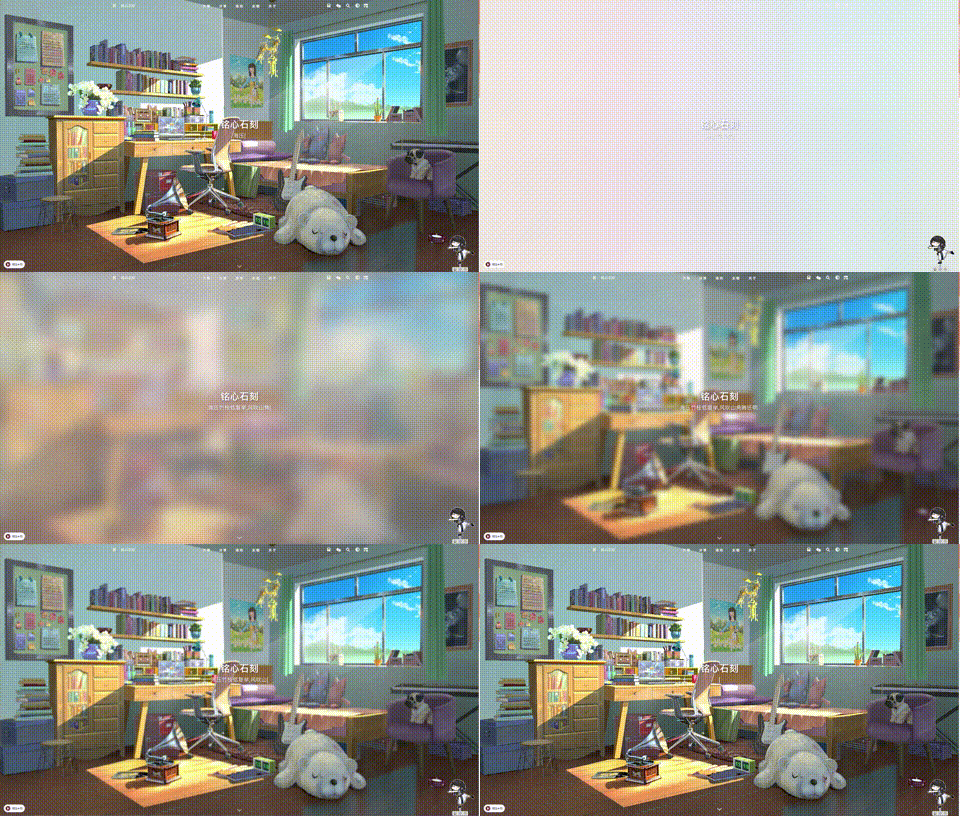
- 原理是先加载小图文件并进行高斯模糊处理,在大图加载完成后再对大图进行加载。
## 操作步骤
## 1、新建文件
- 新建文件`themes/anzhiyu/source/js/imgloaded.js`新增以下内容,并按照注释调整照片路径
``` json
// 首页头图加载优化
/**
* @description 实现medium的渐进加载背景的效果
*/
class ProgressiveLoad {
constructor(smallSrc, largeSrc) {
this.smallSrc = smallSrc;
this.largeSrc = largeSrc;
this.initTpl();
}
/**
* @description 生成ui模板
*/
initTpl() {
this.container = document.createElement('div');
this.smallStage = document.createElement('div');
this.largeStage = document.createElement('div');
this.smallImg = new Image();
this.largeImg = new Image();
this.container.className = 'pl-container';
this.smallStage.className = 'pl-img pl-blur';
this.largeStage.className = 'pl-img';
this.container.appendChild(this.smallStage);
this.container.appendChild(this.largeStage);
this.smallImg.onload = this._onSmallLoaded.bind(this);
this.largeImg.onload = this._onLargeLoaded.bind(this);
}
/**
* @description 加载背景
*/
progressiveLoad() {
this.smallImg.src = this.smallSrc;
this.largeImg.src = this.largeSrc;
}
/**
* @description 大图加载完成
*/
_onLargeLoaded() {
this.largeStage.classList.add('pl-visible');
this.largeStage.style.backgroundImage = `url('${this.largeSrc}')`;
}
/**
* @description 小图加载完成
*/
_onSmallLoaded() {
this.smallStage.classList.add('pl-visible');
this.smallStage.style.backgroundImage = `url('${this.smallSrc}')`;
}
}
const executeLoad = (config, target) => {
console.log('执行渐进背景替换');
const isMobile = window.matchMedia('(max-width: 767px)').matches;
const loader = new ProgressiveLoad(
isMobile ? config.mobileSmallSrc : config.smallSrc,
isMobile ? config.mobileLargeSrc : config.largeSrc
);
// 和背景图颜色保持一致,防止高斯模糊后差异较大
if (target.children[0]) {
target.insertBefore(loader.container, target.children[0]);
}
loader.progressiveLoad();
};
const config = {
smallSrc: '/img/xiaotu.jpg', // 小图链接 尽可能配置小于100k的图片
largeSrc: '/img/tu.jpg', // 大图链接 最终显示的图片
mobileSmallSrc: '/img/sjxt.jpg', // 手机端小图链接 尽可能配置小于100k的图片
mobileLargeSrc: '/img/sjdt.jpg', // 手机端大图链接 最终显示的图片
enableRoutes: ['/'],
};
function initProgressiveLoad(config) {
const target = document.getElementById('page-header');
if (target && target.classList.contains('full_page')) {
executeLoad(config, target);
}
}
function onPJAXComplete(config) {
const target = document.getElementById('page-header');
if (target && target.classList.contains('full_page')) {
initProgressiveLoad(config);
}
}
document.addEventListener("DOMContentLoaded", function() {
initProgressiveLoad(config);
});
document.addEventListener("pjax:complete", function() {
onPJAXComplete(config);
});
```
```json
// 首页一图流加载优化
/**
* @description 实现medium的渐进加载背景的效果
*/
(function() {
class ProgressiveLoad {
constructor(smallSrc, largeSrc) {
this.smallSrc = smallSrc;
this.largeSrc = largeSrc;
this.initTpl();
this.container.addEventListener('animationend', () => {
this.smallStage.style.display = 'none';
}, {once: true});
}
initTpl() {
this.container = document.createElement('div');
this.smallStage = document.createElement('div');
this.largeStage = document.createElement('div');
this.smallImg = new Image();
this.largeImg = new Image();
this.container.className = 'pl-container';
this.smallStage.className = 'pl-img pl-blur';
this.largeStage.className = 'pl-img';
this.container.appendChild(this.smallStage);
this.container.appendChild(this.largeStage);
this.smallImg.onload = this._onSmallLoaded.bind(this);
this.largeImg.onload = this._onLargeLoaded.bind(this);
}
progressiveLoad() {
this.smallImg.src = this.smallSrc;
this.largeImg.src = this.largeSrc;
}
_onLargeLoaded() {
this.largeStage.classList.add('pl-visible');
this.largeStage.style.backgroundImage = `url('${this.largeSrc}')`;
}
_onSmallLoaded() {
this.smallStage.classList.add('pl-visible');
this.smallStage.style.backgroundImage = `url('${this.smallSrc}')`;
}
}
const executeLoad = (config, target) => {
console.log('执行渐进背景替换');
const isMobile = window.matchMedia('(max-width: 767px)').matches;
const loader = new ProgressiveLoad(
isMobile ? config.mobileSmallSrc : config.smallSrc,
isMobile ? config.mobileLargeSrc : config.largeSrc
);
if (target.children[0]) {
target.insertBefore(loader.container, target.children[0]);
}
loader.progressiveLoad();
};
const ldconfig = {
light: {
smallSrc: '/img/bg2_80kbver.jpg', //浅色模式 小图链接 尽可能配置小于100k的图片
largeSrc: '/img/bg2.jpg', //浅色模式 大图链接 最终显示的图片
mobileSmallSrc: '/img/bg2_80kbver.jpg', //手机端浅色小图链接 尽可能配置小于100k的图片
mobileLargeSrc: '/img/bg2.jpg', //手机端浅色大图链接 最终显示的图片
enableRoutes: ['/'],
},
dark: {
smallSrc: '/img/bg1_80kbver.jpg', //深色模式 小图链接 尽可能配置小于100k的图片
largeSrc: '/img/bg1.jpg', //深色模式 大图链接 最终显示的图片
mobileSmallSrc: '/img/bg1_80kbver.jpg', //手机端深色模式小图链接 尽可能配置小于100k的图片
mobileLargeSrc: '/img/bg1.jpg', //手机端深色大图链接 最终显示的图片
enableRoutes: ['/'],
},
};
const getCurrentTheme = () => {
return document.documentElement.getAttribute('data-theme');
}
const onThemeChange = () => {
const currentTheme = getCurrentTheme();
const config = ldconfig[currentTheme];
initProgressiveLoad(config);
document.addEventListener("DOMContentLoaded", function() {
initProgressiveLoad(config);
});
document.addEventListener("pjax:complete", function() {
onPJAXComplete(config);
});
}
let initTheme = getCurrentTheme();
let initConfig = ldconfig[initTheme];
initProgressiveLoad(initConfig);
const observer = new MutationObserver(mutations => {
mutations.forEach(mutation => {
if (mutation.attributeName === "data-theme" && location.pathname === '/') {
onThemeChange();
}
});
});
observer.observe(document.documentElement, {
attributes: true,
attributeFilter: ["data-theme"]
});
function initProgressiveLoad(config) {
const container = document.querySelector('.pl-container');
if (container) {
container.remove();
}
const target = document.getElementById('page-header');
if (target && target.classList.contains('full_page')) {
executeLoad(config, target);
}
}
function onPJAXComplete(config) {
const target = document.getElementById('page-header');
if (target && target.classList.contains('full_page')) {
initProgressiveLoad(config);
}
}
})();
```
- 新建文件`themes/anzhiyu/source/css/imgloaded.css`新增以下内容,并按照注释自行决定调整内容
```css
/* 首页头图加载 */
.pl-container {
width: 100%;
height: 100%;
position: relative; /* 一图流这里改fixed */
/* 一图流这里加z-index: -2; */
overflow: hidden;
will-change: transform; /* 添加性能优化 */
/* blur-to-clear模糊动画2s */
animation: blur-to-clear 2s cubic-bezier(.62,.21,.25,1) 0s 1 normal backwards running, scale 1.5s cubic-bezier(.62,.21,.25,1) 0s 1 both;
}
.pl-img {
width: 100%;
height: 100%;
position: absolute;
background-position: center;
background-size: cover;
background-repeat: no-repeat;
opacity: 0;
transition: opacity 1s;
}
@keyframes blur-to-clear {
0% {
filter: blur(50px);
opacity: 1;
}
100% {
filter: blur(0);
opacity: 1;
}
}
@keyframes scale {
0% {
transform: scale(1.5) translateZ(0);
opacity: 0;
}
to {
transform: scale(1) translateZ(0);
opacity: 1;
}
}
.pl-visible {
opacity: 1;
}
.pl-blur {
/* 小图锯齿多,增加高斯模糊 */
filter: blur(50px);
}
```
```css
/* 首页头图加载 */
.pl-container {
width: 100%;
height: 100%;
z-index: -2;
position: fixed;
overflow: hidden;
will-change: transform; /* 添加性能优化 */
animation: blur-to-clear 2s cubic-bezier(.62,.21,.25,1) 0s 1 normal backwards running, scale 1.5s cubic-bezier(.62,.21,.25,1) 0s 1 both;
}
.pl-img {
width: 100%;
height: 100%;
position: absolute;
background-position: center;
background-size: cover;
background-repeat: no-repeat;
opacity: 0;
transition: opacity 1s;
}
@keyframes blur-to-clear {
0% {
filter: blur(50px);
opacity: 1;
}
100% {
filter: blur(0);
opacity: 1;
}
}
@keyframes scale {
0% {
transform: scale(1.5) translateZ(0);
opacity: 0;
}
to {
transform: scale(1) translateZ(0);
opacity: 1;
}
}
.pl-visible {
opacity: 1;
}
.pl-blur {
/* 小图锯齿多,增加高斯模糊 */
filter: blur(50px);
}
```
## 2、引入文件
- 在`_config.anzhiyu.yml`主题配置文件下`inject`配置项中`head`和`bottom`处
- 分别引入`imgloaded.css`和`imgloaded.js`文件
```yaml
inject:
head:
-
bottom:
- # 首页图片渐进式加载
```
## 3、配置图片
- 为了使用顶部图功能,你必须在主题配置文件中设置`top_image`为`true`。然后,你可以在`top_image_url`中留空或者填写任意字符串,因为这个值不会影响图片的显示。图片的加载和渲染是由js文件实现的,所以你不需要在配置文件中提供图片的源地址。
```yaml
# The banner image of home page
index_img: "background: url() top / cover no-repeat"
```
- 在`imgloaded.js`中的73到76行(或是83到86行)修改以下示例的部分
- 若是首页一图流渐进式加载的`imgloaded.js`则修改56到71行
```json
const config = {
smallSrc: '/img/xiaotu.jpg', // 小图链接 尽可能配置小于100k的图片
largeSrc: '/img/tu.jpg', // 大图链接 最终显示的图片
mobileSmallSrc: '/img/sjxt.jpg', // 手机端小图链接 尽可能配置小于100k的图片
mobileLargeSrc: '/img/sjdt.jpg', // 手机端大图链接 最终显示的图片
enableRoutes: ['/'],
};
```
```json
const ldconfig = {
light: {
smallSrc: '/img/bg2_80kbver.jpg', //浅色模式 小图链接 尽可能配置小于100k的图片
largeSrc: '/img/bg2.jpg', //浅色模式 大图链接 最终显示的图片
mobileSmallSrc: '/img/bg2_80kbver.jpg', //手机端浅色小图链接 尽可能配置小于100k的图片
mobileLargeSrc: '/img/bg2.jpg', //手机端浅色大图链接 最终显示的图片
enableRoutes: ['/'],
},
dark: {
smallSrc: '/img/bg1_80kbver.jpg', //深色模式 小图链接 尽可能配置小于100k的图片
largeSrc: '/img/bg1.jpg', //深色模式 大图链接 最终显示的图片
mobileSmallSrc: '/img/bg1_80kbver.jpg', //手机端深色模式小图链接 尽可能配置小于100k的图片
mobileLargeSrc: '/img/bg1.jpg', //手机端深色大图链接 最终显示的图片
enableRoutes: ['/'],
},
};
```
## 4、图片懒加载配置修改
- 本文的这一部分是根据**小旦**的概括而写的,作者在此注明出处。
```
lazyload:
enable: true
field: post # site/post
placeholder:
blur: true
progressive: true
```
## 5、大功告成
到这时候,如果你的图片文件配置正确,可以执行Hexo的三连命令来查看效果了!
- 部分教程链接: